Bilibili - 视频客户端
Bilibili 是 YuzukiNeko 上的 B 站客户端:触摸界面(LVGL,1024×768),有封面卡片、带拼音输入法的搜索、边下载边播放的播放器、滚动弹幕、扫码登录和 Wi-Fi 设置。它是一个应用而不是模块,和 NekoBox 一样直接在 SPI NOR flash 中原地运行(XIP),并且用 NekoBox 的播放器文件编译。代码在 zephyr-components/bilibili-tv。
本页按模块讲它是怎么做的,每个模块都附上代码:线程和命令队列、HTTP 与 TLS 客户端、带签名的网页接口、视频流怎样找到并下载、播放器、弹幕,以及界面的每个部分。
| 部分 | 文件 | 作用 |
|---|---|---|
| 命令与线程 | src/main.c、src/core/app.h | 工作线程、命令队列、列表 |
| HTTP 客户端 | src/net/http.c、http_parse.c | 带 Range 的 GET、TLS、分块正文、cookie |
| 网页接口 | src/api/bili_api.c、src/net/wbi.c、bili_parse.c、src/net/json.c | 带签名的请求、解析 |
| 下载 | src/net/download.c | 播放的同时在卡上不断变长的文件 |
| 播放器 | src/player/ | MP4 解封装、H.264 与 AAC 解码、时钟 |
| 弹幕 | src/net/inflate.c、src/api/danmaku.c、src/ui/ui_danmaku.c、src/gfx/shift.c | 获取、解析、绘制、移动 |
| 界面 | src/ui/ | 首页、卡片、封面、搜索、播放页、账号、设置 |
| 账号与 Wi-Fi | src/api/account.c、src/net/wifi.c | 扫码登录、连接、忘记 |
开始之前,请先完成配置开发环境和获取 Zephyr 源码。
构建与运行
. ~/f101-zephyr/env.sh
west build -b yuzukineko -d build/bili zephyr-components/bilibili-tv
镜像从 flash 窗口运行,所以开发流程与 NekoBox 相同:把 zephyr.bin 写到 flash 0x80000,再从 RAM 运行 XIP 加载器(见构建与运行)。这会替换该位置上的 NekoBox;开发时不需要写入启动桩。
xfel spinor write 0x80000 zephyr.bin
xfel write 0x20000 xip-boot_fel.bin
xfel exec 0x20000
TF 卡上需要:
| 文件 | 内容 |
|---|---|
/SD:/wifi.cfg | 第一行网络名,第二行密码(设置界面也会写它) |
/SD:/bilibili/ | 下载的视频,<BV 号>.mp4;完整的文件再次播放时不用下载 |
/SD:/bilibili/auth.cfg | 二维码确认后写入的登录信息 |
/SD:/bilibili/settings.cfg | 音量和亮度 |
整体结构
| 线程 | 优先级 | 作用 |
|---|---|---|
音频(pl_audio) | 3 | 解码 AAC,喂给 codec 环;它的位置就是播放器的时钟 |
显示(disp) | 5 | 把画面提交给显示器并等待翻页 |
视频(pl_video) | 6 | 解封装并解码 H.264,时钟到点时显示画面 |
| 界面 | 播放页上为 8 | LVGL,有弹幕时以固定的 33 ms 节拍运行 |
| 下载、封面 | 8 和 9 | 网络和存储卡 |
| 工作线程 | 更低 | 请求、解析、登录、播放流程 |
播放页上界面线程的优先级低于视频线程:同一优先级时,重绘会让每 5 秒多出 2 到 10 张迟到的画面,优先级 8 时只有 0 到 1 张。
命令与工作线程
界面从不等待网络。每个动作都是放进消息队列的一条命令(app_cmd() 可以从任何线程调用),由工作线程逐条取走。命令声明在 src/core/app.h:
enum app_cmd_type {
	CMD_REFRESH,	/**< arg: list, load its first page again */
	CMD_MORE,	/**< arg: list, append the next page */
	CMD_SEARCH,	/**< keyword in the command: a new search */
	CMD_PLAY,	/**< arg: list << 16 | index */
	CMD_STOP,	/**< back from the player */
	CMD_PAUSE,	/**< toggles */
	CMD_WIFI,	/**< join the network in ssid / psk */
	CMD_QR_START,	/**< ask for a new login code */
	CMD_QR_POLL,	/**< ask how the scan of the code is going */
	CMD_LOGOUT,	/**< forget the login */
	/* ... scan, disconnect, forget, settings, account numbers */
};
K_MSGQ_DEFINE(cmd_q, sizeof(struct cmd), 8, 4);

void app_cmd(enum app_cmd_type type, int arg)
{
	struct cmd c = {.type = type, .arg = arg};

	if (type == CMD_STOP) {
		/* the flag is the whole command: a message left in the queue would stop the next
		 * video as soon as it opens */
		atomic_set(&stop_req, 1);
		return;
	}
	if (k_msgq_put(&cmd_q, &c, K_NO_WAIT) != 0) {
		printk("app: command queue full\n");
	}
}
CMD_STOP 是特例:视频播放期间工作线程正忙在 play() 里,停止命令不能在队列里等。它是一个标志,播放循环和下载都会查看它。工作线程本身就是一个循环:
static void worker_main(void *a, void *b, void *c)
{
	struct cmd cmd;
	/* ... wait for the card, read wifi.cfg, load the login and the settings, join the network */
	for (;;) {
		k_msgq_get(&cmd_q, &cmd, K_FOREVER);
		switch (cmd.type) {
		case CMD_REFRESH:  load(cmd.arg, 1); break;
		case CMD_MORE:     /* load(list, next_page) */ break;
		case CMD_SEARCH:   /* store the keyword */ load(LIST_SEARCH, 1); break;
		case CMD_PLAY:     play(cmd.arg >> 16, cmd.arg & 0xffff); break;
		case CMD_QR_START: qr_start(); break;
		case CMD_QR_POLL:  qr_poll(); break;
		/* ... */
		}
	}
}
列表
列表是一个固定数组,由工作线程填写、界面线程读取,用互斥锁保护。gen 记录列表被替换了多少次,界面据此知道什么时候要重建卡片:
struct vlist {
	struct bili_video v[MAX_VIDEOS];	/* MAX_VIDEOS = 100 */
	int count, next_page, pages;
	bool more, loading;
	int error;		/* what the last page request returned, 0 when it worked */
	uint32_t gen;
	char keyword[96];
};

/* the first page replaces the list, the others are appended without the videos already there */
static void list_store(enum list_id list, int page, const struct bili_video *v, int n, int pages)
{
	struct vlist *l = &lists[list];

	k_mutex_lock(&lists_lock, K_FOREVER);
	if (page == 1) {
		l->count = 0;
		l->gen++;
	}
	for (int i = 0; i < n && l->count < MAX_VIDEOS; i++) {
		bool dup = false;

		for (int j = 0; j < l->count && !dup; j++) {
			dup = strcmp(l->v[j].bvid, v[i].bvid) == 0;
		}
		if (!dup) {
			l->v[l->count++] = v[i];
		}
	}
	l->next_page = page + 1;
	l->pages = pages;
	l->more = n >= PAGE_SIZE / 2 && l->count < MAX_VIDEOS && (pages == 0 || page < pages);
	l->loading = false;
	k_mutex_unlock(&lists_lock);
}
load() 按列表选择接口(bili_api_feed、bili_api_popular、bili_api_follow、bili_api_search),保存结果,并给界面一条状态文字。
从工作线程到界面
工作线程从不碰 LVGL 对象。它在互斥锁下把内容写进一小块待处理状态,界面线程在每一轮开始时取走(src/ui/ui.c 里的 ui_run()):
static K_MUTEX_DEFINE(lock);
static struct {
	bool status_dirty, hot_dirty, play_dirty, pos_dirty;
	char status[128];
	/* ... trending words, title, duration, position, paused */
} pend;

void ui_set_status(const char *fmt, ...)
{
	va_list ap;

	k_mutex_lock(&lock, K_FOREVER);
	va_start(ap, fmt);
	vsnprintf(pend.status, sizeof(pend.status), fmt, ap);
	va_end(ap);
	pend.status_dirty = true;
	k_mutex_unlock(&lock);
}
uint32_t ui_run(void)
{
	/* ... copy the dirty parts of pend under the lock, then, without it: */
	if (status_dirty) {
		ui_set_status_label(status);
	}
	if (play_dirty) {
		if (playing) {
			ui_play_set(title, dur);
			cover_pause(true);	/* the covers give their memory to the decoder */
			ui_nav(PAGE_PLAY);
		} else {
			cover_pause(false);
			ui_danmaku_set(NULL);
			ui_nav(return_page);
		}
	} else if (pos_dirty && cur == PAGE_PLAY) {
		ui_play_position(pos, paused);
		ui_play_buffered(buffered_permille);
	}
	ui_home_run(cur == PAGE_HOME);
	ui_search_run(cur == PAGE_SEARCH);
	if (cur == PAGE_PLAY && ui_danmaku_active()) {
		ui_danmaku_run(round_us);
	}
	uint32_t next = lv_timer_handler();
	/* ... */
}
状态文字在界面看到之前被设置了两次,就只显示最后一次,状态行本来就该如此。ui_run() 的返回值是调用者可以睡多久:在有弹幕的播放页上它是固定的节拍(beat += 33),而不是“工作完之后再等 40 ms”,因为步长均匀看起来才流畅。
HTTP 客户端
src/net/http.c 是基于 Zephyr socket 的小型 HTTP/1.1 客户端。它存在的原因是回包必须流式处理:一个视频有几兆字节,堆没有这么大,所以正文一到就交给回调。
typedef int (*http_body_fn)(void *ctx, const uint8_t *data, size_t len);

struct http_opts {
	const char *headers;	/**< extra header lines, each ending in CRLF, may be NULL */
	int64_t range_start;	/**< >= 0 asks for the bytes from this offset on */
	int timeout_ms;		/**< no data for this long ends the request, 0 is 15 s */
	int tls_verify;
};

int http_get(const char *url, const struct http_opts *opts, http_body_fn fn, void *ctx,
	     struct http_result *res);
int http_get_text(const char *url, const struct http_opts *opts, char *buf, size_t size,
		  struct http_result *res);	/* the whole body in one buffer */
连接
对 https,socket 是 Zephyr 原生的 TLS socket:协议在创建 socket 时选定,主机名作为选项传入:
static int tcp_connect(const char *host, const char *port, int tls_native, int verify)
{
	struct zsock_addrinfo hints = {.ai_family = AF_INET, .ai_socktype = SOCK_STREAM};
	struct zsock_addrinfo *res;
	int sock, ret;

	ret = zsock_getaddrinfo(host, port, &hints, &res);
	if (ret != 0) {
		return -EHOSTUNREACH;
	}
	sock = zsock_socket(res->ai_family, res->ai_socktype, tls_native ? IPPROTO_TLS_1_2 : IPPROTO_TCP);
	if (sock < 0) {
		ret = -errno;
		zsock_freeaddrinfo(res);
		return ret;
	}
	if (tls_native) {
		int v = verify ? TLS_PEER_VERIFY_REQUIRED : TLS_PEER_VERIFY_NONE;

		zsock_setsockopt(sock, SOL_TLS, TLS_PEER_VERIFY, &v, sizeof(v));
		zsock_setsockopt(sock, SOL_TLS, TLS_HOSTNAME, host, strlen(host) + 1);
	}
	ret = zsock_connect(sock, res->ai_addr, res->ai_addrlen);
	/* ... close and report on failure */
	zsock_freeaddrinfo(res);

	return sock;
}
请求
请求头是浏览器会发的那些:没有 Referer 的请求会被 CDN 拒绝。调用者想续传文件时加上 Range 头,调用者自己的行(cookie)放在最后:
ret = snprintf(req, REQ_SIZE, "GET %s HTTP/1.1\r\nHost: %s\r\n", u.path, u.host);
ret += snprintf(req + ret, REQ_SIZE - ret,
		"User-Agent: " USER_AGENT "\r\n"
		"Referer: https://www.bilibili.com/\r\nAccept: */*\r\nConnection: close\r\n");
if (opts != NULL && opts->range_start > 0) {
	ret += snprintf(req + ret, REQ_SIZE - ret, "Range: bytes=%lld-\r\n",
			(long long)opts->range_start);
}
if (opts != NULL && opts->headers != NULL) {
	ret += snprintf(req + ret, REQ_SIZE - ret, "%s", opts->headers);
}
strcpy(req + ret, "\r\n");
Connection: close 让客户端保持简单:每个请求一个连接,正文的结束就是连接的结束,或者服务器声明的长度。连接时间、首字节时间和总时间都被测量并放进 struct http_result 返回(下载很慢时日志里打印的就是它们)。
解析器
回包以 RECV_SIZE 为块读取,交给一个状态机(src/net/http_parse.c),它认识头、带长度的正文、直到关闭的正文和分块正文。它是单独的文件,这样可以在主机上测试:
enum http_parse_state {
	HP_HEADER, HP_BODY_LENGTH, HP_BODY_CLOSE,
	HP_CHUNK_SIZE, HP_CHUNK_EXT, HP_CHUNK_DATA, HP_CHUNK_CR, HP_TRAILER,
	HP_DONE,
};

/* returns 1 when the body is complete, 0 for more, negative on a malformed answer */
int http_parser_feed(struct http_parser *p, const uint8_t *data, size_t len,
		     http_body_fn fn, void *ctx);
接收循环是 socket 和解析器之间的胶水:
for (;;) {
	ssize_t n = conn_recv(c, rx, RECV_SIZE);

	if (n < 0) { ret = n; break; }
	if (n == 0) { ret = http_parser_eof(p) == 1 ? 0 : -ECONNRESET; break; }
	ret = http_parser_feed(p, rx, n, gate_body, &g);	/* gate_body calls fn for 2xx only */
	if (ret == 1) { ret = 0; break; }
	if (ret < 0) { break; }
}
回包的 Set-Cookie 字段被收集到 res->set_cookie;登录需要它们。
带签名的网页接口
全部在 src/api/bili_api.c 里,签名在 src/net/wbi.c,MD5 在 src/net/md5.c,解析在 src/api/bili_parse.c。
签名密钥
大多数列表和播放接口都要求签名(WBI)。密钥并不保密:/x/web-interface/nav 的回包里有两个图片地址(wbi_img.img_url 和 sub_url),即使没有人登录也有(回包的 code 是 -101,但数据仍在)。把两个文件名里扩展名前的 32 个字符拼成 64 个字符,用一张固定的 64 项表重新排列;结果的前 32 个字符就是密钥:
static const uint8_t mixin[64] = {
	46, 47, 18, 2, 53, 8, 23, 32, 15, 50, 10, 31, 58, 3, 45, 35, 27, 43, 5, 49, 33, 9, 42, 19, 29, 28,
	14, 39, 12, 38, 41, 13, 37, 48, 7, 16, 24, 55, 40, 61, 26, 17, 0, 1, 60, 51, 30, 4, 22, 25, 54,
	21, 56, 59, 6, 63, 57, 62, 11, 36, 20, 34, 44, 52,
};

/* the 32 characters in front of the extension of the last path segment */
static int image_key(const char *url, char out[32])
{
	const char *name = strrchr(url, '/');
	const char *dot;

	name = name != NULL ? name + 1 : url;
	dot = strchr(name, '.');
	if (dot == NULL || dot - name != 32) {
		return -EINVAL;
	}
	memcpy(out, name, 32);

	return 0;
}

int wbi_make_key(const char *img_url, const char *sub_url, char key[33])
{
	char raw[64];

	if (image_key(img_url, raw) != 0 || image_key(sub_url, raw + 32) != 0) {
		return -EINVAL;
	}
	for (int i = 0; i < 32; i++) {
		key[i] = raw[mixin[i]];
	}
	key[32] = '\0';

	return 0;
}
static int load_key(void)
{
	char *a = fetch(API "/x/web-interface/nav");
	int ret;

	if (a == NULL) {
		return -EIO;
	}
	ret = bili_parse_nav(a, wbi_key);	/* wbi_make_key() of the two addresses in the answer */
	free(a);

	return ret;
}
给请求签名
wbi_query() 把参数当作 name=value 字符串,写出带签名的查询串:
- 加上
wts=<时间戳>; - 按名称排序;
- 对值做百分号编码(先去掉
!'()*这几个字符,服务器也是这样做的); - 拼成
a=1&b=2,末尾接上密钥,这段文本的 MD5 就是w_rid; - 返回排好序的查询串,后面接
&w_rid=<哈希>。
/* order by name: the text up to the '=' */
static int name_cmp(const char *a, const char *b)
{
	for (;; a++, b++) {
		unsigned char x = *a == '=' ? 0 : *a, y = *b == '=' ? 0 : *b;

		if (x != y || x == 0) {
			return (int)x - (int)y;
		}
	}
}

/* percent encoding of everything but the unreserved characters, after the server's filter */
static int encode(const char *s, char *out, size_t size)
{
	size_t n = 0;

	for (; *s != '\0'; s++) {
		unsigned char c = *s;

		if (strchr("!'()*", c) != NULL) {
			continue;
		}
		if ((c >= '0' && c <= '9') || (c >= 'a' && c <= 'z') || (c >= 'A' && c <= 'Z') ||
		    c == '-' || c == '_' || c == '.' || c == '~') {
			out[n++] = c;
		} else {
			n += snprintf(out + n, size - n, "%%%02X", c);
		}
	}
	out[n] = '\0';

	return n;
}
排序是对指针做插入排序:列表只有几项。服务器不检查时间戳,所以此时没有网络时间的开发板用一个固定的基数加运行时间:
static int64_t stamp(void)
{
	return 1700000000 + k_uptime_get() / 1000;
}
一次调用,两种重试
call() 是发出带签名请求的唯一途径。它签名、发送、读取回包的 code,并对这个站点已知的两种失败各恢复一次:
#define CODE_RISK	(-412)	/* too many requests / no browser identity */
#define CODE_SIGN_1	(-403)	/* the signature or its key is wrong */
#define CODE_SIGN_2	(-352)

static char *call(const char *path, const char *const *params, int count, int *code)
{
	bool new_key = false, new_cookie = false;

	for (;;) {
		char url[800], query[600], *a;

		*code = 0;
		if (wbi_key[0] == '\0' && load_key() != 0) {
			return NULL;
		}
		if (wbi_query(params, count, wbi_key, stamp(), query, sizeof(query)) < 0) {
			return NULL;
		}
		snprintf(url, sizeof(url), API "%s?%s", path, query);
		a = fetch(url);
		if (a == NULL) {
			return NULL;
		}
		*code = bili_parse_code(a);
		if (*code == 0) {
			return a;
		}
		free(a);
		if ((*code == CODE_SIGN_1 || *code == CODE_SIGN_2) && !new_key) {
			new_key = true;
			wbi_key[0] = '\0';		/* load the key again */
		} else if (*code == CODE_RISK && !new_cookie) {
			new_cookie = true;
			if (load_cookie() != 0) {	/* /x/frontend/finger/spi */
				return NULL;
			}
		} else {
			return NULL;
		}
	}
}
load_cookie() 向 /x/frontend/finger/spi 要两个 id,保存为 buvid3=...; buvid4=...。headers() 用这些 id 以及(有登录时)account.c 的登录 cookie 构造每个请求的 Cookie: 行:
static const char *headers(void)
{
	char acc[460];

	account_cookie(acc, sizeof(acc));
	if (buvid[0] == '\0' && acc[0] == '\0') {
		return NULL;
	}
	snprintf(cookie_hdr, sizeof(cookie_hdr), "Cookie: %s%s%s\r\n", buvid,
		 buvid[0] && acc[0] ? "; " : "", acc);

	return cookie_hdr;
}
各个接口
| 函数 | 接口 |
|---|---|
bili_api_feed() | /x/web-interface/wbi/index/top/feed/rcmd(登录后是个性化的) |
bili_api_popular() | /x/web-interface/popular |
bili_api_search() | /x/web-interface/wbi/search/type |
bili_api_hot_words() | /x/web-interface/wbi/search/square |
bili_api_follow() | /x/polymer/web-dynamic/v1/feed/all?type=video(需要登录;缓冲区 512 KiB,20 条动态的回包超过 128 KiB) |
bili_api_stream() | /x/player/wbi/playurl(没有 cid 时先调 /x/player/pagelist) |
bili_api_danmaku() | /x/v1/dm/list.so?oid=<cid> |
bili_api_qr_new()、bili_api_qr_poll() | passport.bilibili.com/x/passport-login/web/qrcode/generate 和 /poll |
bili_api_user()、bili_api_user_stats() | /x/web-interface/nav、/x/web-interface/nav/stat |
以推荐为例:
int bili_api_feed(int page, struct bili_video *out, int max)
{
	char ps[16], idx[24];
	const char *params[] = {ps, "fresh_type=4", idx, "web_location=1430650"};
	char *a;
	/* ps=<max>, fresh_idx=<page> ... */
	a = call("/x/web-interface/wbi/index/top/feed/rcmd", params, ARRAY_SIZE(params), &code);
	/* ... bili_parse_feed(a, out, max) */
}
不建树地读 JSON
回包有 10 到 500 KiB 的 JSON,堆又很小,所以 src/net/json.c 不建树。一个值就是指向它在回包中第一个字符的指针;只有被要求取字符串时才复制:
const char *js_get(const char *obj, const char *key);	/* value of a key of an object */
const char *js_path(const char *v, const char *path);	/* "data.owner.name" */
const char *js_first(const char *arr);			/* first and next element of an array */
const char *js_next(const char *elem);
int js_str(const char *v, char *out, size_t size);	/* decodes escapes and \uXXXX to UTF-8 */
long long js_int(const char *v, long long def);
js_get() 逐个走过一个对象的键,用 js_skip() 跳过不想要的值;js_path() 对每一段带点的路径调用它一次。bili_parse.c 里的解析函数是对数组的循环,只复制卡片要显示的内容:
int bili_parse_feed(const char *json, struct bili_video *out, int max)
{
	int n = 0;

	for (const char *it = js_first(js_path(json, "data.item")); it != NULL && n < max;
	     it = js_next(it)) {
		if (parse_video(it, &out[n]) == 0) {
			n++;
		}
	}

	return n;
}

int bili_parse_playurl(const char *json, struct bili_stream *out)
{
	const char *d = js_first(js_path(json, "data.durl"));

	if (d == NULL || js_str(js_get(d, "url"), out->url, sizeof(out->url)) <= 0) {
		return -ENOENT;
	}
	out->size = js_int(js_get(d, "size"), 0);
	out->length_ms = js_int(js_get(d, "length"), 0);
	out->quality = js_int(js_path(json, "data.quality"), 0);

	return 0;
}
文本必须是合法的 JSON;每个函数遇到被截断的回包都返回 NULL,而不会越过结尾。解析函数有用录下的回包做的主机测试(见下面的测试辅助)。
找到视频流
int bili_api_stream(const struct bili_video *v, struct bili_stream *out)
{
	char bvid[32], cid[32], qn[16];
	const char *params[] = {bvid, cid, qn, "fnval=0", "fnver=0", "fourk=0", "platform=html5",
				"high_quality=1"};
	uint64_t id = v->cid;
	char *a;
	int ret, code;

	if (id == 0) {
		ret = resolve_cid(v->bvid, &id);	/* a search result has no cid */
		if (ret != 0) {
			return ret;
		}
	}
	snprintf(bvid, sizeof(bvid), "bvid=%s", v->bvid);
	snprintf(cid, sizeof(cid), "cid=%llu", (unsigned long long)id);
	snprintf(qn, sizeof(qn), "qn=%d", QN_360P);		/* QN_360P is 16 */
	a = call("/x/player/wbi/playurl", params, ARRAY_SIZE(params), &code);
	if (a == NULL) {
		return code != 0 ? -EACCES : -EIO;
	}
	ret = bili_parse_playurl(a, out);
	out->cid = id;
	free(a);
	/* the address of the answer is used as it is, over HTTPS (CONFIG_BILI_CDN_HTTPS) */

	return ret;
}
qn=16是 360P。这种画质的视频是一个 MP4 文件,H.264 视频和 AAC 音频交织在一起:fnval=0要的是旧的durl格式,而不是分离的 DASH 流。开发板只需要解一个文件的封装,不用合并音视频,码率也低到 Wi-Fi 和 SD 卡跟得上。- 更高的画质(720P 及以上)需要有更多权限的登录,并且使用 DASH;这里不用。这个客户端的登录只让列表个性化。
- 回包里有
durl[0].url(带签名和截止时间的 CDN 地址)、字节大小和毫秒时长。
边下载边播放
流程
src/main.c 里的 play() 就是整个流程,由工作线程运行:
static void play(enum list_id list, int index)
{
	/* ... */
	ui_set_playing(v.title, 0);			/* the player page opens at once */
	for (int i = 0; i < 50 && cover_in_use() > 0; i++) {
		k_msleep(20);
	}
	cover_flush();					/* the decoder needs the memory the covers hold */

	ret = bili_api_stream(&v, &s);			/* the address of the file */
	/* the comments: nothing to wait for when they cannot be had */
	n = bili_api_danmaku(s.cid, dm);
	ui_set_danmaku(dm);

	snprintf(path, sizeof(path), CONFIG_BILI_CACHE_DIR "/%s.mp4", v.bvid);
	if (cached(path, s.size)) {
		ret = player_open(path, &info);		/* a complete file from an earlier time */
	} else {
		static struct player_growing g;

		g = (struct player_growing){.total = s.size, .avail = dl_avail};
		ret = dl_start(s.url, path, s.size, on_progress, NULL);
		ret = player_open_growing(path, &g, &info);
		prebuffer(&s, &info);			/* wait for a few seconds of the stream */
	}
	player_play();
	play_loop(&v, &info, growing);			/* until the end or a stop */
}
先打开播放页,再把封面清掉,因为 640×360 的解码器需要约 6 MB,而这些内存被封面占着。player_growing 是 static 的,因为播放器在关闭之前一直保存着这个指针:内层块里的变量到那时已经不存在了(这是一个真实的 bug:开发板在第一次暂停时死机)。
下载线程
src/net/download.c 以 64 KiB 为一块下载到卡上的文件里。文件经由一个暂存缓冲区写入,每写一块就同步,并把“已经在文件里、也在目录项里”的字节数公布出来供播放器读取:
#define STAGE_SIZE	(64 * 1024)
#define ATTEMPTS	6

static int flush(struct dl *d)
{
	ssize_t n = fs_write(d->fp, d->stage, d->used);

	if (n != (ssize_t)d->used) {
		return n < 0 ? (int)n : -EIO;
	}
	d->written += d->used;
	d->used = 0;
	if (d->synced != NULL) {
		/* a reader opens the file by its own handle: the size must be in the directory entry */
		int ret = fs_sync(d->fp);

		if (ret != 0) {
			return ret;
		}
		atomic_set(d->synced, (atomic_val_t)d->written);
	}

	return 0;
}
正文回调把数据复制进暂存区,满了就写;它每 250 ms 报告一次进度,用户退出时返回 -ECANCELED。重试循环会从已有的字节处继续一次中断的传输:
for (attempt = 0; attempt < ATTEMPTS; attempt++) {
	struct http_opts o = {.range_start = d.done, .timeout_ms = 10000};
	struct http_result r;

	ret = http_get(url, &o, sink, &d, &r);
	/* ... flush what is staged ... */
	if (ret == 0 && (r.status >= 500 || r.status == 429) && attempt + 1 < ATTEMPTS) {
		/* the cache server is busy or has none of the file yet: a new request often works */
		k_msleep(1000 * (attempt + 1));
		continue;
	}
	if (ret == 0 && r.status / 100 != 2) {
		ret = r.status == 403 || r.status == 404 ? -EACCES : -EIO;
		break;
	}
	if (ret == 0 && d.done > 0 && o.range_start > 0 && r.status != 206) {
		ret = -EPROTO;	/* the server does not do ranges: cannot continue */
		break;
	}
	if (ret == 0 && (total == 0 || d.done >= total)) {
		break;			/* complete */
	}
	k_msleep(500);			/* the connection broke: again from d.done */
}
后台形式(dl_start())里,同一个 run() 是一个线程(优先级 8)的主体,它的状态是两个原子变量,播放器通过 dl_avail() 读取:
static atomic_t bg_synced, bg_state;	/* state: 0 running, 1 done, negative errno */

uint64_t dl_avail(void *ctx, int *state)
{
	*state = (int)atomic_get(&bg_state);

	return (uint64_t)(uint32_t)atomic_get(&bg_synced);
}
读一个没有下完的文件
播放器(src/player/player.c,由 NekoBox 的播放器加上这一处改动构建)通过一个函数读文件。读取需要的字节还不在文件里时,它等待下载,然后重新打开自己的文件句柄,因为 FAT 文件句柄只记得打开时看到的大小:
/* waits until [off, off + len) is in the file; reopens the handle when it is older than the data */
static int pl_grow_wait(struct reader *r, uint64_t off, size_t len)
{
	uint64_t need = off + len, av;
	int st;

	for (;;) {
		av = pl_grow->avail(pl_grow->ctx, &st);
		if (st == 1) {
			av = pl_grow->total;		/* the download is complete */
		}
		if (av >= need) {
			break;
		}
		if (st < 0) {
			return -EIO;			/* the download failed */
		}
		k_msleep(20);
	}
	if (need > r->known) {
		fs_close(&r->f);
		fs_file_t_init(&r->f);
		int ret = fs_open(&r->f, pl_path, FS_O_READ);

		if (ret != 0) {
			return ret;
		}
		r->known = st == 1 ? UINT64_MAX : av;
	}

	return 0;
}

int pl_file_read(void *ctx, uint64_t off, void *buf, size_t len)
{
	struct reader *r = ctx;
	/* ... */
	if (pl_grow != NULL && !(r->win_len > 0 && off >= r->win_off && off + len <= r->win_off + r->win_len)) {
		ret = pl_grow_wait(r, off, len);	/* only when the read is not in the window */
		if (ret != 0) {
			return ret;
		}
	}
	/* ... read through a 128 KiB window (video) or a 32 KiB one (audio) */
}
这个站点的文件,moov 在开头,所以解封装器在最初几 KB 之后就能读到轨道表。播放器为视频和音频各开一个 reader,两者都经过 pl_file_read()。
等第一批存量
还在下载的文件打开后先停在第一张画面上(PLAYER_PAUSED:显示第一张画面,什么都不播放),应用等下载到几秒的数据之后才用 player_play() 启动声音和视频,这样连接的慢启动不会吃掉最初几秒:
/* player.c, open_impl() */
pl_state = g != NULL ? PLAYER_PAUSED : PLAYER_PLAYING;
pl_req.seq = 0;
pl_req_post(0, g == NULL);
static void prebuffer(const struct bili_stream *s, const struct player_info *info)
{
	uint64_t want, av;
	int64_t t0 = k_uptime_get();
	int state;

	if (CONFIG_BILI_PREBUFFER_SEC <= 0 || info->duration_ms == 0 || s->size == 0) {
		return;
	}
	want = s->size * (CONFIG_BILI_PREBUFFER_SEC * 1000ULL) / info->duration_ms;
	want = MIN(MAX(want, 256 * 1024ULL), s->size);
	for (;;) {
		av = dl_avail(NULL, &state);
		ui_set_status("buffering %u%%", (unsigned int)MIN(av * 100 / want, 99ULL));
		if (state != 0 || av >= want || atomic_get(&stop_req) ||
		    k_uptime_get() - t0 > CONFIG_BILI_PREBUFFER_TIMEOUT_SEC * 1000) {
			break;
		}
		k_msleep(50);
	}
}
want 是 BILI_PREBUFFER_SEC 秒(6)的平均码率,至少 256 KiB;下载结束、失败、被取消,或超过 BILI_PREBUFFER_TIMEOUT_SEC(20 秒)时,等待立即结束。显示的百分比是这批存量的,不是整个文件的:文件有几兆字节,它的百分比整个等待期间都停在 1 或 2。之后在 play_loop() 里,画面停住超过 1.5 秒时会再次出现 缓冲中...,表示下载落后了。
播放器线程
播放器由三个线程运行。它们通过一个带序号的请求通信;新请求(跳转、暂停)会让正在运行的会话结束,下一个会话从请求的位置开始:
struct request {
	uint32_t seq;
	int64_t pos_us;
	bool play;
};

bool pl_req_changed(uint32_t seq)
{
	return pl_quit || pl_req_get().seq != seq;
}
暂停不是“停掉时钟”:它是对当前位置的一个不播放的会话的请求。这个会话从位置之前的关键帧开始解码,显示位置处的画面并保持住(held = true);恢复是对同一位置的一个播放会话的请求。这也是为什么跳转和暂停的开销差不多,以及为什么视频最好每一两秒有一个关键帧。
时钟。 音频位置就是播放器的时钟:codec 已经播放的块数乘以每块的时长,再加上自上一块以来的时间:
int64_t pl_audio_clock_us(void)
{
	uint32_t blocks, cycle;

	if (!pl_audio_running) {
		return -1;
	}
	i2s_sunxi_codec_tx_position(pl_codec_i2s, &blocks, &cycle);

	return pl_audio_base_us + (int64_t)blocks * AAC_FRAMES * 1000000 / pl_mp4.audio.sample_rate +
	       (int64_t)k_cyc_to_us_floor64(k_cycle_get_32() - cycle);
}
等待一张画面。 视频线程解码后,等到时钟到达这张画面的时间。晚了两帧以上的画面不显示(WAIT_LATE,日志里记为 late):
#define DROP_US		(2 * 33367)

enum wait_result pl_wait_for(uint32_t seq, int64_t pts_us, int64_t start_us, int64_t start_ms)
{
	for (;;) {
		int64_t now = pl_audio_clock_us(), diff;

		if (pl_req_changed(seq)) {
			return WAIT_ABORT;
		}
		if (now < 0) {
			/* no sound running: the wall clock from the start of the session */
			now = start_us + (k_uptime_get() - start_ms) * 1000;
		}
		diff = pts_us - now;
		if (diff < -DROP_US) {
			return WAIT_LATE;
		}
		if (diff <= LEAD_US) {
			return WAIT_ON_TIME;
		}
		k_msleep(CLAMP((int)((diff - LEAD_US) / 1000), 1, 20));
	}
}
会话循环。 每个 H.264 sample 从文件读出(经过 pl_file_read()),从 AVCC(长度前缀)转换成 Annex B(起始码),再喂给视频引擎。解码器用返回码说明它需要什么:
ret = vdec_stream_get_frame(pl_vdec_dev, stream, &frame);
if (ret == 0) {
	/* the pictures from the key frame up to the position are not shown */
	w = r->play ? pl_wait_for(r->seq, pts_us, r->pos_us, start_ms) : WAIT_ON_TIME;
	if (w == WAIT_ON_TIME) {
		k_msgq_put(&disp_q, &frame, K_FOREVER);	/* to the display thread */
		pl_pos_publish(r->seq, pts_us / 1000);
		if (!r->play) {
			held = true;			/* a paused session shows one picture and holds */
			break;
		}
	} else {
		vdec_frame_release(pl_vdec_dev, &frame);	/* late */
	}
	continue;
}
if (ret == -EBUSY) {			/* the decoder is working */
	k_msleep(2);
	continue;
}
/* -EAGAIN: it wants data */
if (pl_file_read(&pl_vfile, s.offset, raw, s.size) == 0) {
	ab_len = avcc_to_annexb(raw, s.size, ab, first || s.sync);
	ret = vdec_stream_feed(pl_vdec_dev, stream, ab + ab_used, ab_len - ab_used, pending_pts, &used);
}
显示线程。 提交一张画面要等上一张翻页,这会卡住解码器,所以由单独的线程来做。它只有在下一张画面显示出来之后才交还上一张,由视频线程释放(这样解码器保持单线程):
K_MSGQ_DEFINE(disp_q, sizeof(struct vdec_frame), 1, 4);
K_MSGQ_DEFINE(done_q, sizeof(struct vdec_frame), 4, 4);

static void disp_main(void *a, void *b, void *c)
{
	struct vdec_frame f, shown = {0};

	for (;;) {
		k_msgq_get(&disp_q, &f, K_FOREVER);
		/* ... a frame without a buffer ends the session ... */
		show(&f);			/* display_sunxi_show_yuv(): returns when the picture is up */
		if (shown.priv != NULL) {
			k_msgq_put(&done_q, &shown, K_FOREVER);
		}
		shown = f;
	}
}
画面以 NV12 和 BT.709 矩阵送到视频层(display_sunxi_show_yuv());视频引擎和显示引擎读的是同一块内存,CPU 从不碰像素。
弹幕
获取与解压
一个视频的弹幕是一个 XML 文件(/x/v1/dm/list.so?oid=<cid>),服务器以原始 deflate 发送。两者都不会整个保存:正文随着 TLS 记录到达,经过流式解压器(src/net/inflate.c,我们自己的 deflate 解码器)进入流式 XML 扫描器(src/api/danmaku.c):
/* the bytes of the answer: raw deflate as the server sends it, or the XML itself */
static int dm_body(void *ctx, const uint8_t *d, size_t n)
{
	struct dm_sink *s = ctx;
	int ret;

	if (!s->started) {
		s->started = true;
		s->plain = n > 0 && d[0] == '<';
	}
	if (s->plain) {
		return dm_parser_feed(s->parser, d, n);
	}
	ret = inflate_feed(s->inf, d, n);

	return ret < 0 ? ret : 0;	/* 1: the stream is complete, what follows is of no interest */
}
扫描器与集合
扫描器是一个小状态机:标签外的文本、一个标签、<d p="..."> 元素的文本。属性 p 是 时间,模式,字号,颜色,...:
static int tag_done(struct dm_parser *p)
{
	p->state = P_OUT;
	p->tag[p->tag_n] = '\0';
	if (strncmp(p->tag, "d p=\"", 5) == 0) {
		p->raw_n = 0;
		p->in_d = true;
		parse_p(p, p->tag + 5);			/* time, mode, colour */
	} else if (strcmp(p->tag, "/d") == 0 && p->in_d) {
		p->in_d = false;
		return add_item(p);			/* unescape the text, store it */
	}

	return 0;
}
集合是两个数组:条目(毫秒时间、颜色、文本偏移、模式、长度)和一个存放所有文本的池。文本在字符边界处截断为 90 字节,集合有上限(BILI_DM_MAX_ITEMS、BILI_DM_POOL_KB)。读完最后一个字节后,条目按时间排序,位置用二分查找:
struct dm_item {
	uint32_t t_ms;
	uint32_t rgb;		/* 0xRRGGBB */
	uint32_t off;		/* position of the text in the pool */
	uint8_t mode;		/* 1 scroll, 4 bottom, 5 top, 6 reverse */
	uint8_t len;
};

uint32_t dm_find(const struct dm_set *set, uint32_t t_ms)
{
	uint32_t lo = 0, hi = set->count;

	while (lo < hi) {
		uint32_t mid = (lo + hi) / 2;

		if (set->items[mid].t_ms < t_ms) {
			lo = mid + 1;
		} else {
			hi = mid;
		}
	}

	return lo;
}
显示
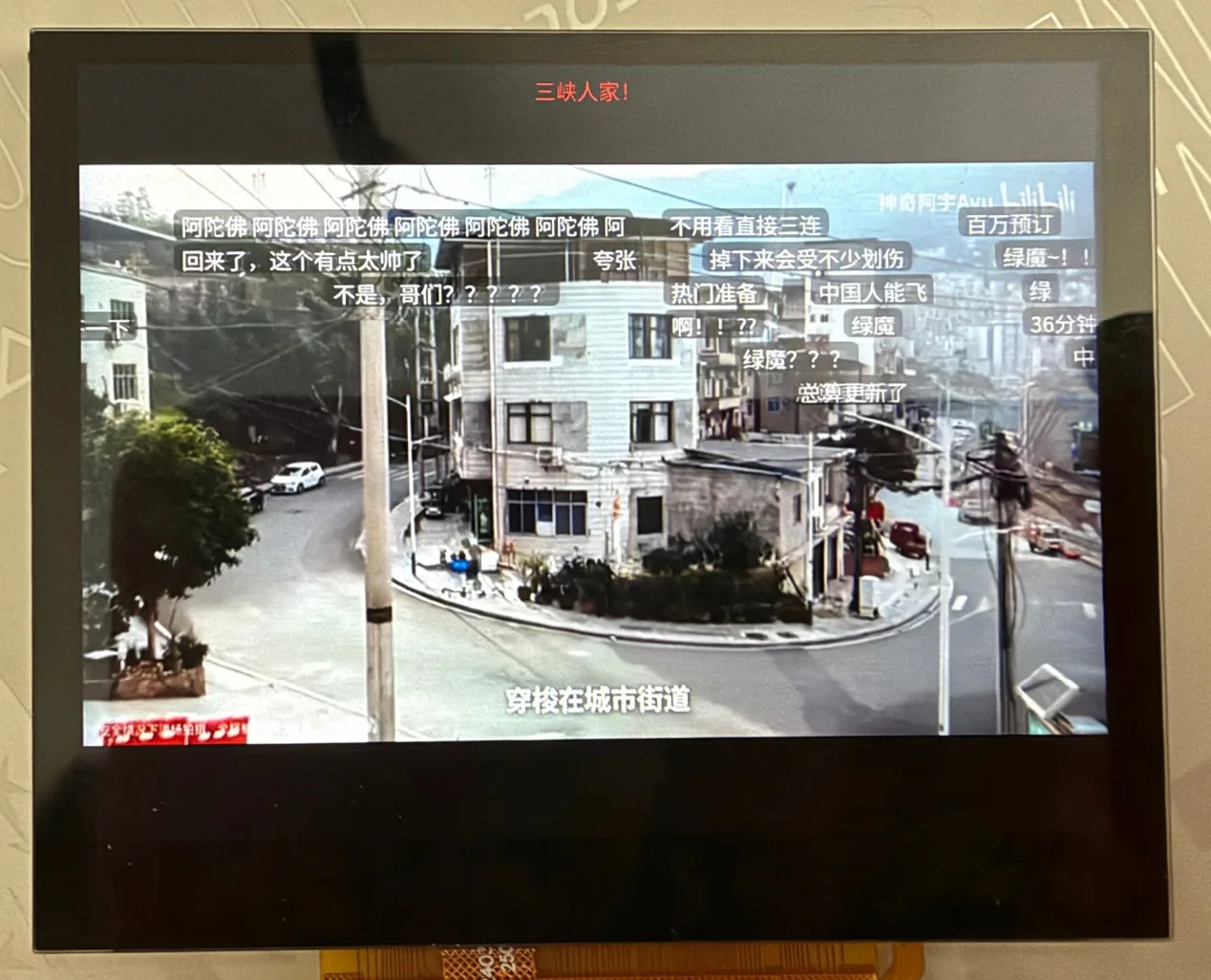
视频上叠着滚动弹幕。标题在最上面,画面在视频平面上,弹幕是在它上方移动的 LVGL 标签,分成几行,白字加深色底,在任何画面上都看得清。
ui_danmaku_run() 每一轮由界面调用一次。它在视频上方持有 BILI_DM_ACTIVE(20)个 LVGL 标签的池。一条弹幕占用一个空闲标签;滚动弹幕还需要一条不会追上前一条的行:
#define LANE_H		34
#define SPEED		170		/* pixels per second */
#define GAP		28
#define TOP_ROWS	4
#define BOTTOM_ROWS	4
#define FIXED_MS	4000

/* where a scrolling comment is at the time p: all of them move at one speed */
static int32_t scroll_px(uint32_t p)
{
	return (int32_t)((uint64_t)p * SPEED / 1000);
}

static bool spawn(const struct dm_item *it, uint32_t p)
{
	/* ... */
	w = lv_text_get_width(text, it->len, ui_font_m, 0) + 16;
	if (kind == K_SCROLL) {
		for (int i = 0; i < SCROLL_ROWS; i++) {
			if (p >= scroll_free_at[i]) {	/* the lane is free again */
				row = i;
				break;
			}
		}
		if (row < 0) {
			return false;
		}
		/* the next one may enter when the tail of this one has come in, plus a gap */
		scroll_free_at[row] = p + (uint32_t)(w + GAP) * 1000 / SPEED;
		x = SCREEN_W;
		y = 4 + (TOP_ROWS + row) * LANE_H;
	} else {
		/* top and bottom: a row that is free for FIXED_MS */
	}
	/* set the text, the colour, the size and the place, show the label */
}
因为所有滚动弹幕速度相同,每个标签的 x 都是一个数的函数:x = SCREEN_W + s0 - scroll_px(now),其中 s0 = scroll_px(t0) 是弹幕显示时取的。很深的文字颜色会被改成白色,这样才能在画面上读得清(readable()),标签带 40% 的黑色背景。
驱动 p 的时钟跟随视频位置,但做了平滑,这样位置汇报得晚时文字不会一格一格地跳:
if (playing) {
	int32_t err = (int32_t)(pos - now) - clk_off;

	if (clk_sync || err > CLK_SNAP_MS || err < -CLK_SNAP_MS) {
		clk_off = (int32_t)(pos - now);		/* jump: after a seek or a stall */
		clk_sync = false;
	} else {
		clk_off += err / 8;			/* otherwise follow slowly */
	}
}
p = now + clk_off;
/* never far ahead of the video (a stall), and never backwards */
当一轮耗时超过 60 ms 时,density_div 变成 2,隔一条丢一条,直到每一轮重新变快。
当作一张图来移动
移动 20 个标签会让 LVGL 把每个标签的旧位置和新位置都重画一遍,也就是在视频上做 20 次小的文字重绘。因为它们移动的距离相同,ui_danmaku.c 改为用 2D 加速器把这一层当作一张图来移动,只让 LVGL 画右边新进来的那一条。LVGL 自己的刷新在开始时调用 dm_strips()(LV_EVENT_REFR_START):
static void dm_strips(lv_event_t *e)
{
	lv_display_t *d = lv_display_get_default();
	lv_area_t lanes = {0, LANES_Y, SCREEN_W - 1, LANES_Y + LANES_H - 1}, x;
	bool other = false;

	if (pend_dx == 0) {
		return;
	}
	/* is anything else going to be drawn in the lanes (a button, the message)? */
	for (uint32_t i = 0; i < d->inv_p && !other; i++) {
		other = !d->inv_area_joined[i] && lv_area_intersect(&x, &d->inv_areas[i], &lanes);
	}
	if (other) {
		n_other++;			/* then the lanes are drawn whole */
	} else if (shift_cols(0, LANES_Y, SCREEN_W, LANES_H, pend_dx, false) != 0) {
		n_failed++;
	} else {
		lanes.x1 = SCREEN_W - pend_dx;	/* only the new columns are drawn */
		n_shifted++;
	}
	lv_inv_area(d, &lanes);
	pend_dx = 0;
}
shift_cols()(src/gfx/shift.c)是帧缓冲内部的一次拷贝,从 x+dx 到 x,然后把右边剩下的几列用透明黑填充:
int shift_cols(int x, int y, int w, int h, int dx, bool sync)
{
	struct g2d_surface f, b;
	struct g2d_rect src, dst, strip;
	int ret;

	/* ... checks: ready, 0 < dx < w, inside the frame buffer, self check passed ... */
	surfaces(&f, &b);
	sys_cache_data_flush_range(fb + (size_t)y * stride, (size_t)h * stride);
	src = (struct g2d_rect){x + dx, y, w - dx, h};
	dst = (struct g2d_rect){x, y, w - dx, h};
	ret = g2d_blit(g2d, &f, &src, &f, &dst, G2D_ROTATE_0, G2D_FLAG_NO_CACHE_OPS);
	if (ret == 0) {
		strip = (struct g2d_rect){x + w - dx, y, dx, h};
		g2d_fill(g2d, &f, &strip, 0);
	}
	sys_cache_data_invd_range(fb + (size_t)y * stride, (size_t)h * stride);

	return ret;
}
在同一个缓冲内向左拷贝,源和目的是重叠的;第一次使用时,cols_check() 画一个测试图案、移动并比较,所以 G2D 如果做不对,就会关掉这个功能,而不是画出乱码。
标签本身在下一轮还是要到达新的 x,但移动标签是一次样式修改,LVGL 在布局更新时才应用它,那会再次让旧位置和新位置失效。所以这个移动在关闭失效标记的窗口里做:
lv_display_t *d = lv_display_get_default();

lv_display_enable_invalidation(d, false);
for (int i = 0; i < CONFIG_BILI_DM_ACTIVE; i++) {
	if (slots[i].used && slots[i].kind == K_SCROLL) {
		lv_obj_set_x(slots[i].lbl, slots[i].x);
	}
}
lv_obj_update_layout(layer);		/* the style change is applied now, with nothing marked dirty */
lv_display_enable_invalidation(d, true);
用户界面
字体和配色
屏幕 1024×768。LVGL 画在 ARGB 层,显示引擎把它混合到视频层之上。配色是深色的(src/ui/ui_priv.h):
#define C_BG		lv_color_hex(0x0b0f14)
#define C_BAR		lv_color_hex(0x141a21)
#define C_CARD		lv_color_hex(0x1c232c)
#define C_CARD_PRESS	lv_color_hex(0x2a3643)
#define C_ACCENT	lv_color_hex(0x00a1d6)	/* the blue of the site */
#define C_TEXT		lv_color_hex(0xe8edf2)
#define C_DIM		lv_color_hex(0x8a97a6)
中文使用 Noto Sans SC(SIL OFL),由 tools/make_font.py 裁剪到 GB2312、假名和标点(约 2.7 MB),作为字节数组包含进来,用 TinyTTF 以三种字号绘制,每种有自己的字形缓存:
static const uint8_t ttf[] = {
#include "font.inc"
};

static const lv_font_t *make(int px, int cache)
{
	lv_font_t *f = lv_tiny_ttf_create_data_ex(ttf, sizeof(ttf), px, LV_FONT_KERNING_NONE, cache);

	if (f == NULL) {
		return &lv_font_montserrat_20;
	}
	/* the symbols of LVGL (arrows, play, ...) are not in the font */
	f->fallback = &lv_font_montserrat_20;

	return f;
}

void ui_fonts_init(void)
{
	ui_font_s = make(18, 160);
	ui_font_m = make(22, 320);
	ui_font_l = make(28, 64);
}
这个数组留在 flash 窗口里,从不复制到 RAM。字距调整是关闭的(CMake 里设 LV_TINY_TTF_CACHE_KERNING_CNT=0):TinyTTF 的字距缓存会把条目还给字形缓存,导致字形重叠。
首页
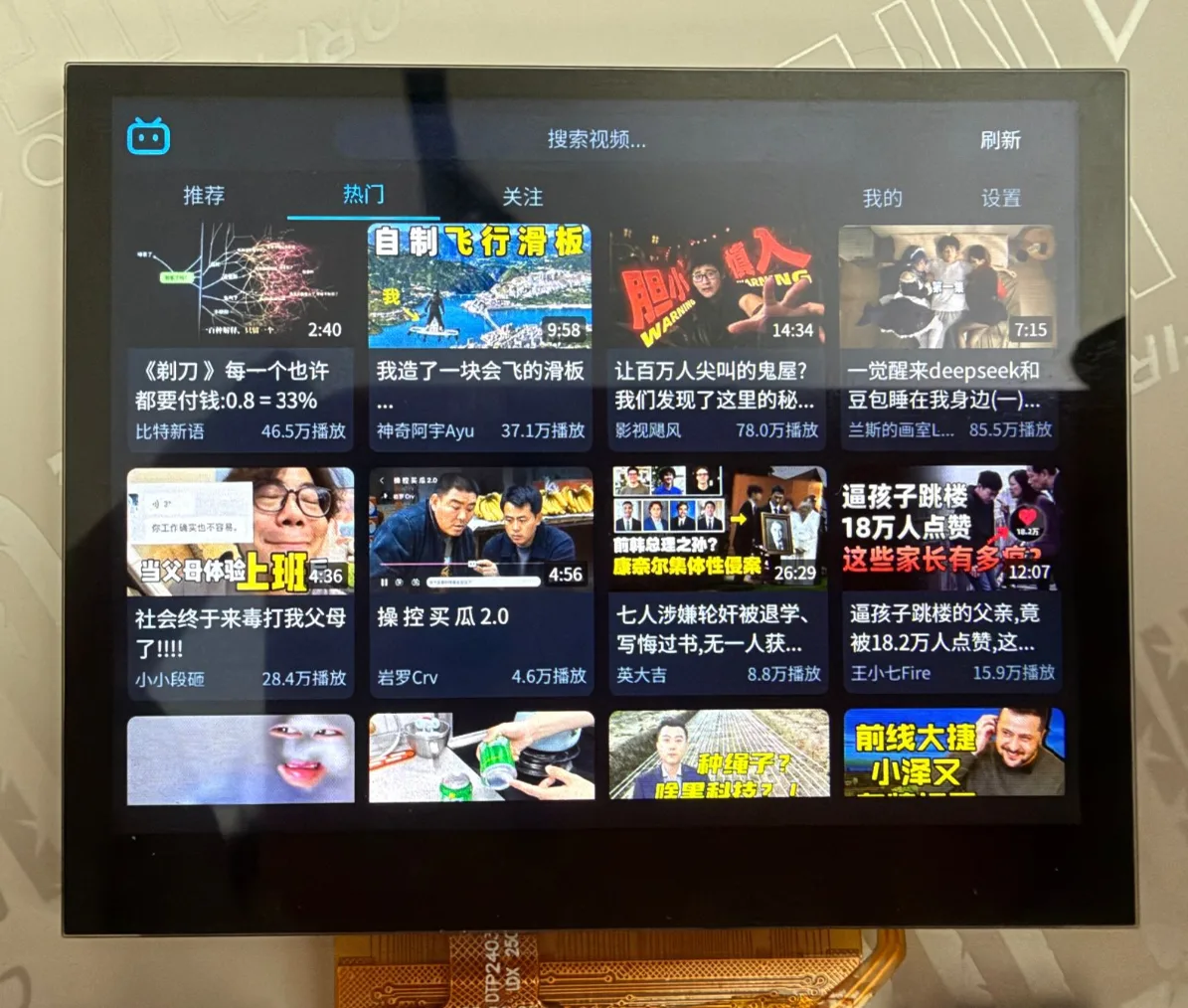
照片里是热门页。顶栏有标志、搜索框(“搜索视频...”)和刷新按钮;下面左边是推荐、热门、关注三个标签,右边是我的和设置,当前的有下划线。视频是四列封面卡片:封面角上有时长,下面是两行标题,最下面是 UP 主和播放量。
+--------------------------------------------------------------+
| [logo]  [ 搜索 ..................................]  [刷新]   |  BAR_H 72
| 推荐  热门  关注                                  我的  设置  |  TABS_H 52
|--------------------------------------------------------------|
| +------+ +------+ +------+ +------+                           |
| | 封面 | | 封面 | | 封面 | | 封面 |                           |
| | 标题 | | 标题 | | 标题 | | 标题 |   4 列,每张 236 px      |
| |UP/播放| |UP/播放| |UP/播放| |UP/播放|                         |
| +------+ +------+ +------+ +------+                           |
+--------------------------------------------------------------+
ui_home.c 在一行里有五个标签按钮,每个后面是一个面板或网格。前三个是列表,后两个是面板:
#define LIST_TABS	3	/* recommend, popular, following: a card grid each */
#define TAB_ME		3	/* at the right end of the row, with the settings */
#define TAB_SETTINGS	4
#define TABS		5

static void show_tab(int t)
{
	tab = t;
	for (int i = 0; i < TABS; i++) {
		bool on = i == t;

		lv_obj_set_style_text_color(lv_obj_get_child(tab_btn[i], 0), on ? C_ACCENT : C_DIM, 0);
		lv_obj_set_style_border_width(tab_btn[i], on ? 3 : 0, 0);
		/* the grid or the panel of the tab is shown, the others hidden */
	}
}

/* ... */
lv_obj_add_flag(tab_btn[2], LV_OBJ_FLAG_HIDDEN);	/* "following": until there is a login */
卡片网格
ui_card.c 把一张卡片建成普通的 LVGL 对象,包含封面图、时长标签、标题(两行)、播放量和 UP 主。位置由序号算出,所以不用任何布局:
#define CARD_W		236
#define CARD_COLS	4

lv_obj_set_pos(o, (idx % CARD_COLS) * (CARD_W + MARGIN),
		  (idx / CARD_COLS) * (ui_card_height() + MARGIN));
封面上方的圆角不是用裁剪画的(裁剪会让 LVGL 在离屏图层里渲染对象,很慢)。它们是两张 10×10 的 A8 遮罩,颜色和页面背景相同,盖在角上:
#define CORNER		10
static uint8_t corner_px[2][CORNER_STRIDE * CORNER] __aligned(4);

for (int y = 0; y < CORNER; y++) {
	for (int x = 0; x < CORNER; x++) {
		float dx = x + 0.5f - CORNER, dy = y + 0.5f - CORNER;
		float a = sqrtf(dx * dx + dy * dy) - CORNER + 0.5f;	/* 0 inside the circle, 1 outside */
		uint8_t v = a <= 0.0f ? 0 : (a >= 1.0f ? 255 : (uint8_t)(a * 255.0f));

		corner_px[0][y * CORNER_STRIDE + x] = v;
		corner_px[1][y * CORNER_STRIDE + CORNER - 1 - x] = v;	/* the mirror image */
	}
}
一个 100 个视频的列表有 100 张卡片,但只有屏幕附近的才存在。window_rows() 说明哪些行必须有控件(屏幕以及上下各一张卡片高度);其余的会被删除,进入视野时再重建:
static void window_rows(struct ui_grid *g, int *first, int *last)
{
	int row_h = ui_card_height() + MARGIN;
	int top = lv_obj_get_scroll_y(g->obj), vh = lv_obj_get_height(g->obj);
	int rows = (g->built + CARD_COLS - 1) / CARD_COLS;

	*first = MAX(0, (top - row_h) / row_h);
	*last = MIN(rows - 1, (top + vh + row_h) / row_h);
}
接近列表末尾时,ui_grid_more() 向工作线程要下一页(CMD_MORE),每种列表长度只要一次(asked_at)。
通过移动画面来滚动
和弹幕同样的办法,用在网格上:手指把列表滚动 dy 像素时,LVGL 会移动所有卡片并想把整个列表重画一遍。scrolled() 则让加速器移动画面,只标记新进来的行:
static void scrolled(lv_event_t *e)
{
	struct ui_grid *g = lv_event_get_user_data(e);
	lv_display_t *d = lv_display_get_default();
	int y = lv_obj_get_scroll_y(g->obj), dy = y - g->last_scroll;

	g->last_scroll = y;
	g->covers_dirty = true;
	/* ... for a jump, a hidden list or a step as big as the list: draw everything ... */
	if (!move_pending(d, &r, dy)) {
		/* something else waits to be drawn inside the list: draw everything */
	} else {
		g->shift_dy += dy;		/* the picture is moved once per frame, at the refresh */
		if (dy > 0) {
			g->pend_bottom = MIN(h, g->pend_bottom + dy);
			g->pend_top = MAX(0, g->pend_top - dy);
		} else {
			g->pend_top = MIN(h, g->pend_top - dy);
			g->pend_bottom = MAX(0, g->pend_bottom + dy);
		}
		lv_display_enable_invalidation(d, false);	/* LVGL's own full redraw is left out */
		refresh_soon(d);
	}
}
在下一次刷新开始时(add_strips(),LV_EVENT_REFR_START),失效标记重新打开,shift_rows() 按整帧的步数移动列表的画面,新进来的行被标为脏,LVGL 只画它们。这期间到达的封面保留它的脏区(move_pending() 把它移动同样的步数),所以不会被画两次。LVGL 在滚动开始和结束时给列表设置的状态会刷新它的样式,以前会把整个列表重画一遍;state_guard_on/off 在这期间关闭失效标记。
封面
封面从图片服务器经过视频引擎到屏幕,CPU 不转换任何一个像素。卡片按地址请求封面;三个线程(BILI_COVER_THREADS)负责获取和解码,一个 BILI_COVER_CACHE(24)张图片的缓存用引用计数保存它们:
enum slot_state { SLOT_FREE, SLOT_QUEUED, SLOT_BUSY, SLOT_READY, SLOT_FAILED };

struct slot {
	enum slot_state state;
	char pic[URL_LEN];
	uint32_t *px;
	int refs;		/* cards that show it */
	uint8_t tries;		/* fetches that failed on the network */
	uint32_t used;		/* tick of the last use, for the choice of what to throw out */
};

void cover_request(const char *pic);			/* queue it if it is not there */
const uint32_t *cover_acquire(const char *pic);		/* NULL until it is ready; counts a reference */
void cover_release(const char *pic);
服务器负责缩放:请求是 <地址>@236w_133h_1c.jpg,所以文件很小(JPEG_MAX 是 48 KiB)。优先处理最新请求的线程(它就是屏幕上的那张)用 http_get_text() 获取并解码:
n = http_get_text(url, &(struct http_opts){.range_start = -1, .timeout_ms = 8000}, (char *)jpeg,
		  JPEG_MAX, NULL);
ret = jpeg_for_engine(jpeg, n) ? vdec_decode_image(vdec, VDEC_CODEC_JPEG, jpeg, n, VDEC_FORMAT_NV12, &f)
			       : -ENOTSUP;
if (ret == 0) {
	px = aligned_alloc(64, COVER_BYTES);
	to_xrgb(&f, px);		/* G2D: NV12 -> XRGB8888 at the size of the cover */
	vdec_frame_release(vdec, &f);
} else if (ret == -ENOTSUP) {
	px = decode_soft(jpeg, n);	/* the engine takes baseline 4:2:0 only: tjpgd for the rest */
}
jpeg_for_engine() 先读 JPEG 头,只接受引擎能解码的(8 位、三个分量、采样 2×2/1×1/1×1、基线);它会拒绝的文件绝不交给它。to_xrgb() 是一次 g2d_blit(),读取 NV12 图片,一遍完成转换并缩放到卡片大小:
struct g2d_surface src = {
	.format = G2D_PIXFMT_NV12, .width = f->width, .height = f->height,
	.plane = {(void *)f->plane[0], (void *)f->plane[1]}, .pitch = {f->stride[0], f->stride[1]},
};
struct g2d_surface dst = {
	.format = G2D_PIXFMT_XRGB8888, .width = COVER_STRIDE / 4, .height = COVER_H,
	.plane = {out}, .pitch = {COVER_STRIDE},
};
g2d_blit(g2d, &src, &sr, &dst, &dr, G2D_ROTATE_0, G2D_FLAG_YUV_FULL_RANGE);
结果的行距是 960 字节、64 字节对齐(其他行距时 LVGL 画出了噪点)。视频播放期间 cover_pause(true) 停掉这些线程,cover_flush() 释放图片,因为解码器需要这些内存。
搜索
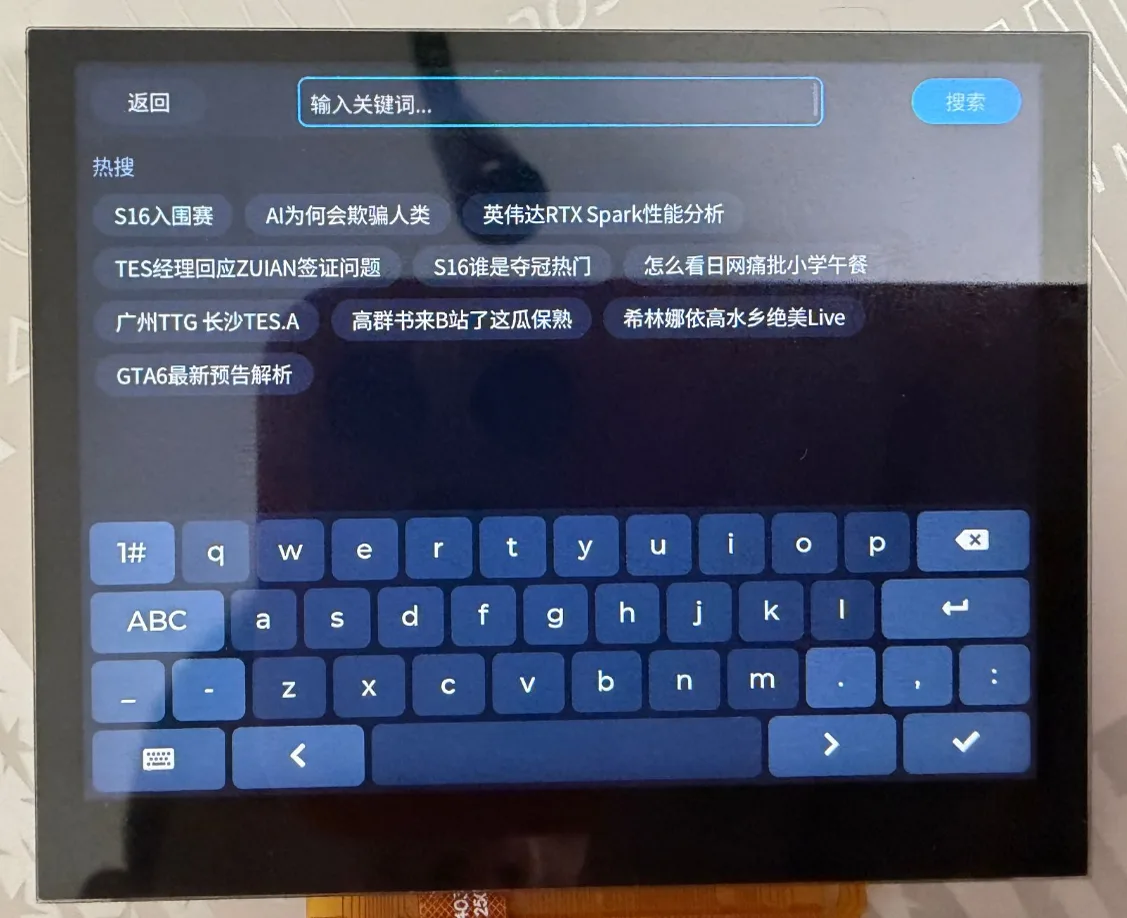
搜索页:左上是返回,中间是文本框(“输入关键词...”),右边是搜索按钮,下面是热搜词按钮,底部是 LVGL 键盘。用它输入拼音字母会通过拼音输入法给出中文候选;点一个热搜词就直接搜它。
搜索页是一个文本框、LVGL 键盘和 lv_ime_pinyin,后者按固件提供的字典逐个音节输入中文:
kb = lv_keyboard_create(page);
ui_keyboard_style(kb);

ime = lv_ime_pinyin_create(page);
lv_ime_pinyin_set_dict(ime, (lv_pinyin_dict_t *)bili_pinyin_dict);
lv_ime_pinyin_set_keyboard(ime, kb);
字典(src/ui/pinyin_dict.c)由 tools/make_pinyin_dict.py 生成:对每个无声调音节,列出字体里有的字,按频率从高到低(频率来自 jieba 的词典,音节来自 pypinyin)。输入法取第一个以输入字母开头的条目,所以条目是排好序的,“ni”排在“nian”之前。输入框下面的热搜词行来自 CMD_HOT;点一下把词放进输入框并开始搜索。结果和其他列表一样;播放某个结果时,工作线程用 /x/player/pagelist 补上 cid。
播放页
/* The progress bar is also the place to seek: the finger sets the position, letting go jumps there. */
#define SEEK_MARGIN	8	/* thousandths kept back from the end of the downloaded part */

static void seek_move(void)
{
	/* lim: the position cannot go past what is downloaded */
	int v, lim = buffered >= 1000 ? 1000 : buffered - SEEK_MARGIN;
	lv_point_t p;

	lv_indev_get_point(lv_indev_active(), &p);
	v = (p.x - a.x1 - bar_x) * 1000 / bar_w;
	v = CLAMP(v, 0, MAX(lim, 0));
	drag_v = v;
	/* the time label, the bar and the knob follow the finger */
}

static void seek_event(lv_event_t *e)
{
	lv_event_code_t code = lv_event_get_code(e);

	touched();
	if (code == LV_EVENT_PRESSED) {
		dragging = true;
		seek_move();
	} else if (code == LV_EVENT_PRESSING) {
		if (dragging) {
			seek_move();
		}
	} else if ((code == LV_EVENT_RELEASED || code == LV_EVENT_PRESS_LOST) && dragging) {
		/* a finger that slides off the strip still sets the position */
		dragging = false;
		player_seek((uint32_t)((uint64_t)duration * drag_v / 1000));
	}
}
buffered 是已下载部分的千分比:下载的 on_progress() 用 ui_set_buffered() 设置它。进度条把两条条叠在一起画,已下载的部分和播放位置。按钮图标在 LV_EVENT_DRAW_MAIN_END 事件的 icon_draw() 里用 lv_draw_line()、lv_draw_triangle() 和 lv_draw_rect() 画出(播放是三角形,暂停是两条竖条,返回是一个尖括号),因为字体里没有符号。
四秒没有触摸后,栏会隐藏:
if (bars_visible && !paused && k_uptime_get() - last_touch > HIDE_MS) {
	show_bars(false);
}
一个提示条承载所有对用户说的话。它可见时弹幕不会当作图片移动(ui_danmaku_run() 里的 !ui_play_msg_visible()),因为提示条画在同一块区域。
账号
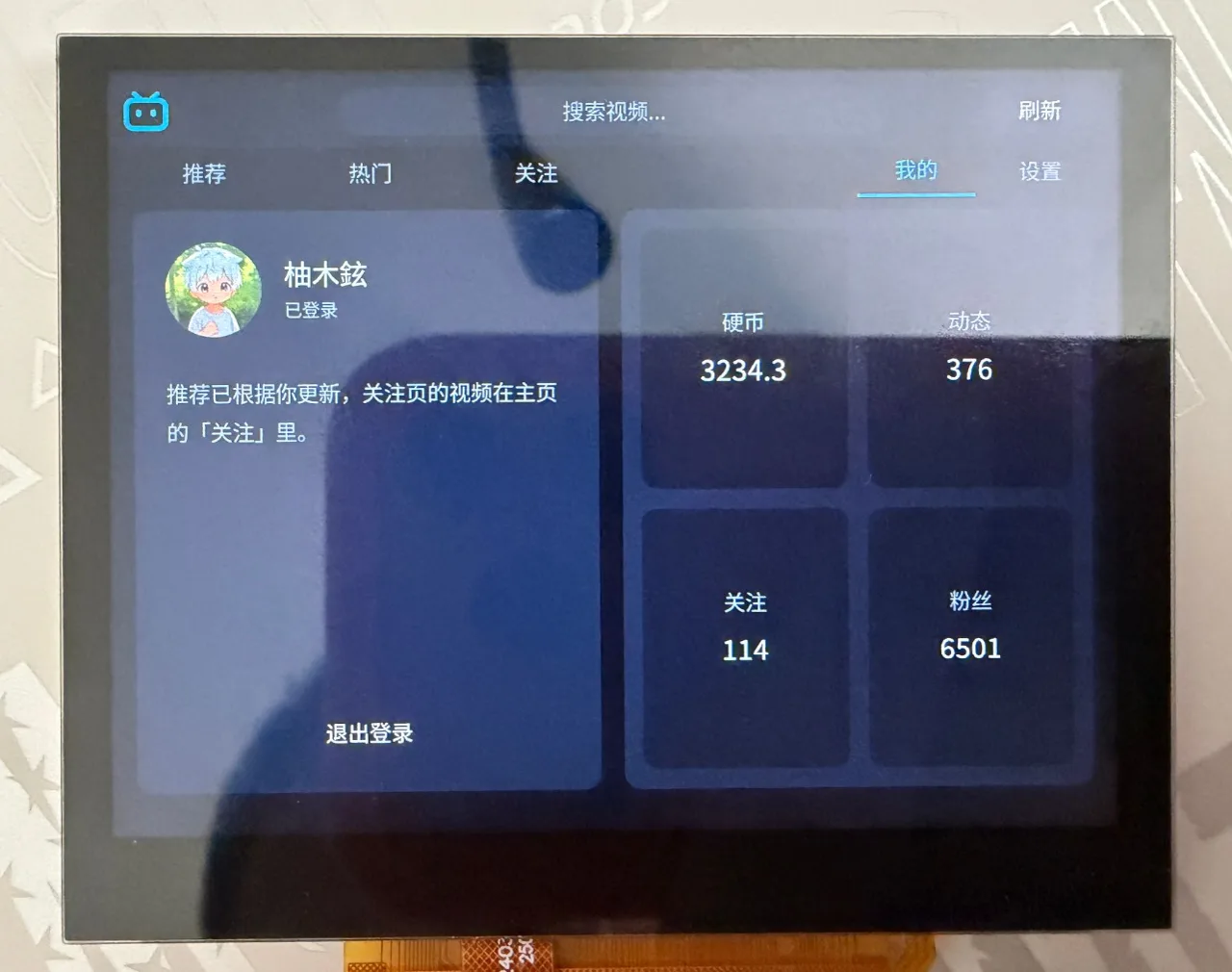
登录后的“我的”页:头像、名字和“已登录”,一行说明推荐已经按账号更新,退出登录按钮,以及硬币、动态、关注、粉丝四块数据。
登录使用网页的二维码流程,开始时不需要任何 cookie:
int bili_api_qr_new(char *url, size_t url_size, char *key, size_t key_size)
{
	char *a = fetch(PASSPORT "/x/passport-login/web/qrcode/generate");
	/* data.url (what the code shows) and data.qrcode_key */
}

int bili_api_qr_poll(const char *key, int *state)
{
	/* GET .../qrcode/poll?qrcode_key=<key> */
	ret = bili_parse_qr_poll(a, state, NULL, 0);
	if (ret == 0 && *state == 0) {
		/* the cookies are in the address of the answer, or set by the server */
		ret = account_set_from_text(a);
		if (ret != 0 && r->set_cookie[0] != '\0') {
			ret = account_set_from_text(r->set_cookie);
		}
	}
}
轮询回包里的 data.code 是 86101(未扫码)、86090(已扫码,等待手机上确认)、86038(已过期)或 0(完成)。工作线程把它们映射成界面显示的状态:
static void qr_poll(void)
{
	int state = -1, ret = bili_api_qr_poll(qr_key, &state);

	switch (state) {
	case 86101: qr_set(QR_WAIT);    break;
	case 86090: qr_set(QR_SCANNED); break;
	case 0:     qr_set(QR_DONE); login_ready(); break;
	case 86038: qr_set(QR_EXPIRED); break;
	default:    qr_set(QR_ERROR);   break;
	}
}
界面从一个定时器发出 CMD_QR_POLL,大约每两秒一次。二维码本身由 LVGL 的 lv_qrcode 画在白色圆角底座上。成功时回包里带有 SESSDATA、bili_jct 和 DedeUserID;account.c 用一个扫描器把它们从文本里取出(text_value() 接受查询串、cookie 列表或 JSON),保存在内存里并写入 auth.cfg:
n = snprintf(buf, sizeof(buf), "SESSDATA=%s\nbili_jct=%s\nDedeUserID=%s\n", acc.sessdata, acc.jct, acc.uid);
从此 account_cookie() 把它们加进每个请求的 Cookie: 行(见上面的 headers())。启动时用 /x/web-interface/nav 检查保存的登录,服务器不接受时就丢弃(login_check())。登录之后重新加载推荐(现在是个人的),“关注”标签出现,账号页显示用户名、头像(cover_load_square())、硬币数以及来自 /x/web-interface/nav/stat 的数字。
Wi-Fi
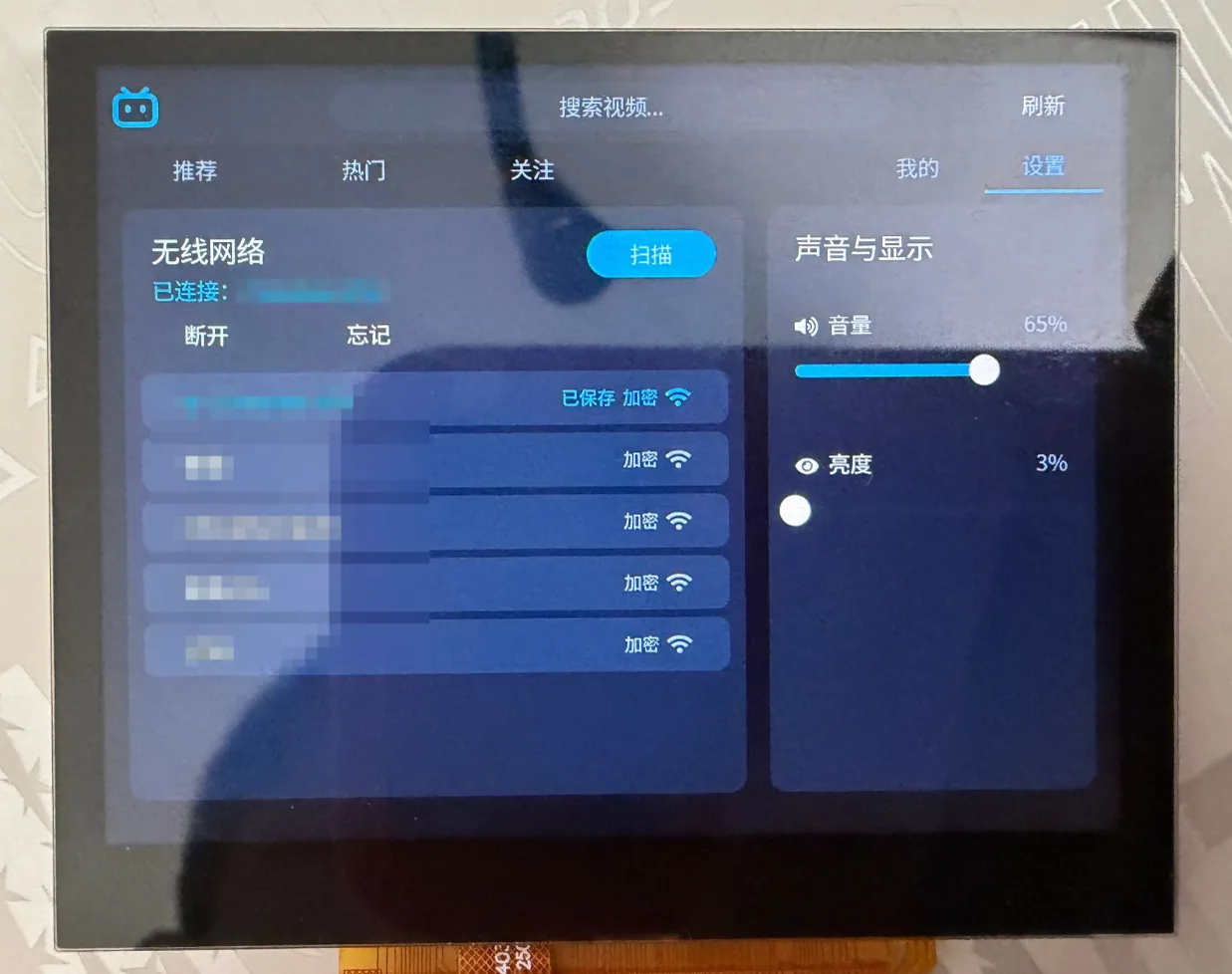
设置页。左边是无线网络卡片:扫描按钮、已连接的网络和断开、忘记按钮,以及扫描到的网络列表,标有已保存、加密和信号强度(照片里网络名做了模糊处理)。右边“声音与显示”是音量和亮度滑块。
src/net/wifi.c 在 Zephyr 的 Wi-Fi 管理之上保持一个小状态机:
enum wifi_state { WIFI_DISCONNECTED, WIFI_CONNECTING, WIFI_CONNECTED, WIFI_FAILED };

int wifi_join(const char *ssid, const char *psk, int timeout_s)
{
	struct net_if *iface = net_if_get_first_wifi();
	struct wifi_connect_req_params p = {
		.ssid = ssid, .ssid_length = strlen(ssid),
		.psk = psk, .psk_length = strlen(psk),
		.security = strlen(psk) ? WIFI_SECURITY_TYPE_PSK : WIFI_SECURITY_TYPE_NONE,
		.channel = WIFI_CHANNEL_ANY, .band = WIFI_FREQ_BAND_UNKNOWN,
	};

	if (state != WIFI_DISCONNECTED) {
		wifi_disconnect();	/* another network, or the same one again: leave it first */
	}
	k_sem_reset(&connected);
	k_sem_reset(&got_ip);
	state = WIFI_CONNECTING;
	ret = net_mgmt(NET_REQUEST_WIFI_CONNECT, iface, &p, sizeof(p));
	/* the driver reports every join, also a failed one, after at most 20 s; a request while an
	 * earlier join runs is answered with -EBUSY, so it is asked again */
	for (int i = 0; ret == -EBUSY && i < 100; i++) {
		k_msleep(500);
		k_sem_reset(&connected);
		ret = net_mgmt(NET_REQUEST_WIFI_CONNECT, iface, &p, sizeof(p));
	}
	/* wait for the association, then for the DHCP address; stop the attempts on a failure,
	 * or a network that does not answer would join later */
}
两个信号量由网络管理事件的处理函数(NET_EVENT_WIFI_CONNECT_RESULT、NET_EVENT_IPV4_ADDR_ADD)给出。设置页显示状态和最后一次错误,用 NET_REQUEST_WIFI_SCAN 扫描,并提供断开、重新连接和忘记;忘记会删除 wifi.cfg,需要在 3 秒内点两次(第一次点击改变按钮文字并启动计时器)。音量和亮度是两个滑块:前者调用 player_set_volume(),后者对显示设备调用 display_set_brightness();两者都由 CMD_SAVE_SETTINGS 保存到 settings.cfg,这样手指每动一步都不会去写卡。
板子上的网络
不经过代理直接运行时发现的一些事:
-
所有连接都是 HTTPS,接口服务器和 CDN 都是,使用 Zephyr 的 TLS socket(mbedTLS)。默认不校验证书(
BILI_TLS_VERIFY可以打开)。每个连接都占内存:mbedTLS 堆是 256 KiB(MBEDTLS_HEAP_SIZE,四个连接时峰值 144 KiB),NET_SOCKETS_TLS_MAX_CONTEXTS是 4(默认值 1 时第二次socket()会以ENOMEM失败)。 -
源地址的 bug:网络协议栈按“目的地址与接口上某个地址的子网共有的前导位数”来选择连接的源地址。环回地址 127.0.0.1(子网 127.0.0.0)对所有首字节小于 128 的目的地址都会胜出,而 B 站的服务器全是这样的地址。SYN 于是发到了环回接口,协议栈自己回了一个 RST:
connect()在 0 到 1 ms 后以ECONNREFUSED失败,没有任何帧离开开发板,看上去就像服务器拒绝了这块板子(也让人觉得必须用代理)。net_if_ipv4_get_best_match()现在在目的地址不是环回地址时跳过环回地址:if (net_ipv4_is_addr_loopback(&ipv4->unicast[i].ipv4.address.in_addr) &&!net_ipv4_is_addr_loopback((struct in_addr *)dst)) {continue;}环回接口保留:Wi-Fi 驱动的控制 socket 要用 127.0.0.1。
-
DNS:
api.bilibili.com会返回六个地址(DNS_RESOLVER_AI_MAX_ENTRIES=8),封面线程还会同时查名字(DNS_NUM_CONCUR_QUERIES=6)。 -
网络缓冲区必须装得下 TCP 窗口;太少会丢包,每次丢包都要付出一次重传超时的代价。
内存
镜像约 10.4 MB(共 16 MB);文本和只读数据(字体、Wi-Fi 固件)留在 flash 窗口里。板上实测:
| 状态 | 空闲 RAM |
|---|---|
| 首页,封面已加载 | 约 6 MB |
| 首页,封面已释放 | 约 9.5 MB |
| 播放器已打开(640×360) | 约 1.8 MB |
视频解码器的画面来自一个预算(VDEC_SUNXI_MAX_MEMORY_KB,这里是 6144;4300 时有些流会在 100 到 400 ms 处停住),CONFIG_VDEC_SUNXI_H264_EXTRA_PICTURES 保留备用画面(太少时画面会撕裂)。LVGL 代码、界面文件和封面解码器从 RAM 运行(BILI_UI_RAM):flash 窗口里的代码在缓存未命中时很慢。
测试辅助
BILI_SELFTEST让界面在板子上自己运行:滚动若干轮、搜索、Wi-Fi 离开/加入/忘记一轮、播放热门视频并做一次暂停、一次恢复和九次快速点按钮。结束时打印selftest: PASS (0 failures),并检查每个视频之后空闲内存和 LVGL 堆是否回到参考值。src/debug/crumbs.c的记录器把最近 256 次上下文切换和中断保存在复位不会清除的内存里,并有一个由线程每秒喂一次的看门狗,整个系统停住时复位开发板。复位后开发板停在 FEL,内存完好;不断电重新启动加载器,就会打印这个环(S切入、I进入中断、X离开,然后是线程名;N是代码用bili_crumb("...")留下的备注)。暂停时的死机就是这样找到的:最后一条备注是视频线程的r-grow,而播放器读的是指向play()里内层块变量的指针。- 主机测试(
tests/host/run.sh,这个目录放在源码旁边,不是仓库的一部分)在构建机上带着 sanitizer 构建并运行 HTTP 解析器、JSON 读取器、MD5 和签名、用录下的回包做的解析、弹幕扫描器和解压器。
限制
- 只有 360P(一个 MP4 文件);不用 720P 及以上。
- 很大的视频(热门列表里的 87 MB 文件)无法播放:解码器内存不够。
- 除非打开,否则不校验证书。
- 弹幕是纯文本,每条一种颜色;只显示滚动、顶部和底部弹幕。
- 不能评论、点赞、投币或发布;没有密码或短信登录。